Sales Order Status
Sales Order (SO) status controls when an order can be edited, released to production, paused, shipped, or closed. Use Update Status on the Sales Order detail page; Velosity only enables transitions that are valid for the order's current state.
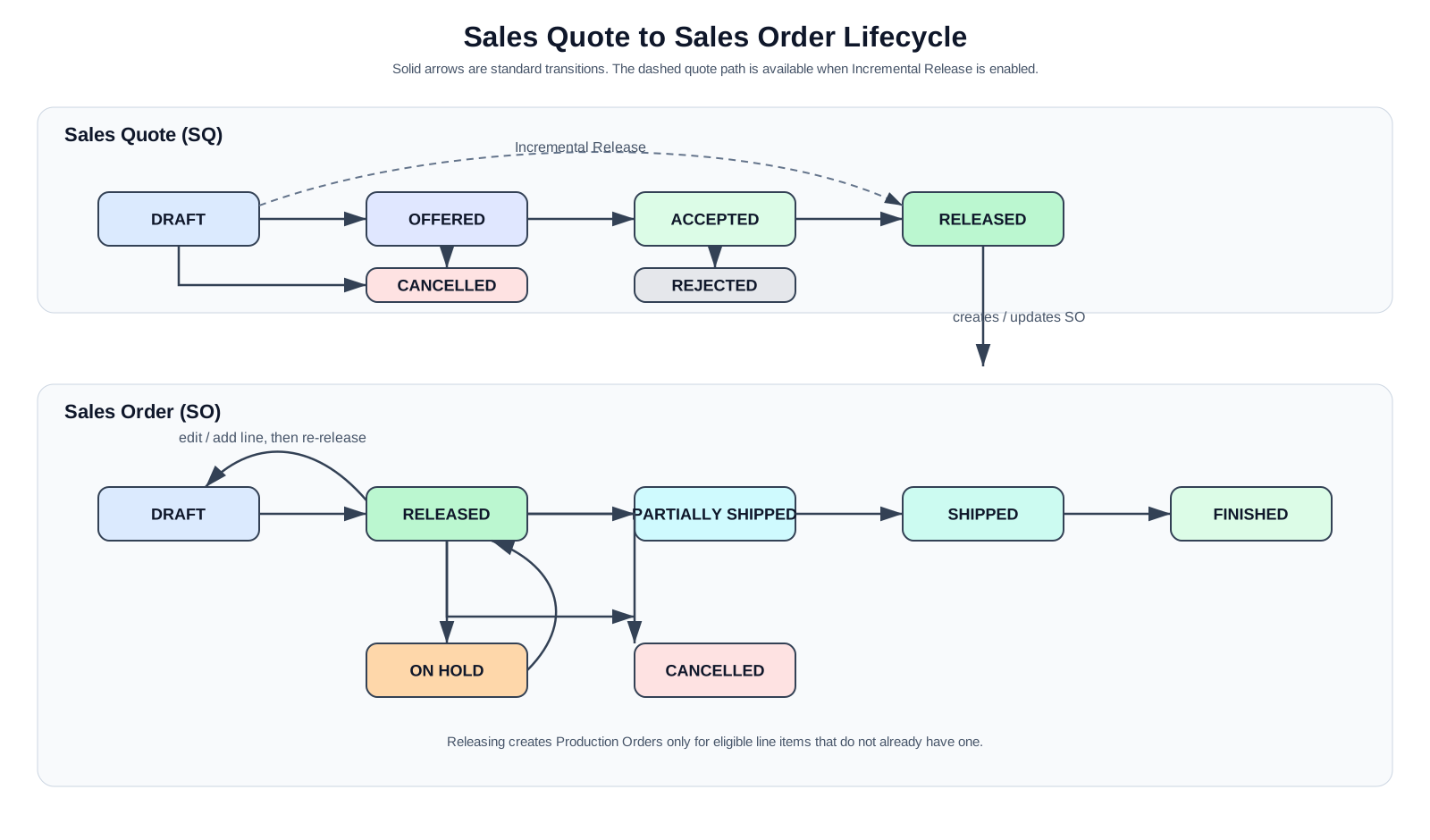
Statuses
| Status | Purpose | Production effect |
|---|---|---|
| DRAFT | Review or edit the order. | No new Production Orders (PRs) are created while the SO is Draft. |
| RELEASED | Send the order to production. | Creates a PR for each eligible line item that does not already have one, then schedules the work. |
| ON HOLD | Pause an order without cancelling it. | Incomplete linked PRs are set to Planned; when released again, they resume normal scheduling. |
| PARTIALLY SHIPPED | Record that part of the order has shipped. | Enables the next shipping transition. |
| SHIPPED | Record that all required shipment activity is complete. | Enables the final completion transition. |
| FINISHED | Close the SO workflow. | No further SO status transitions are available. |
| CANCELLED | Close an order that will not proceed. | Review and cancel any related PRs separately when appropriate. |
Allowed transitions
DRAFT     → RELEASED or CANCELLED
RELEASED  → DRAFT, ON HOLD, PARTIALLY SHIPPED, or CANCELLED
ON HOLD   → RELEASED or CANCELLED
PARTIALLY SHIPPED → SHIPPED
SHIPPED   → FINISHED
Releasing and returning to Draft
DRAFT → RELEASED
Release requires at least one line item and all required Sales Order fields. On release, Velosity creates Production Orders for eligible line items that do not already have one. Existing Production Orders are not duplicated.
RELEASED → DRAFT
Use this transition when a released order must be edited or needs a new configured line item from a Sales Quote/Smart Quote. Returning the SO to Draft does not delete or cancel existing Production Orders. After the edit, release the SO again; Velosity creates Production Orders only for newly eligible line items that are missing one.
Returning a normally released order to Draft does not require a special role. Returning a completed order to Draft is a recovery operation restricted to ADMIN and POWERUSER. Velosity's internal SUPPORT users can also perform that recovery. The Repair missing source lines action uses the same completed-order recovery permission.
Before changing an existing production line, coordinate with Production: the related PR may already be Planned, in progress, or complete.
Holds, shipment, and cancellation
- Moving an SO to ON HOLD pauses incomplete linked PRs by setting them to Planned. It does not discard task progress.
- Follow the shipment sequence RELEASED → PARTIALLY SHIPPED → SHIPPED → FINISHED. The system does not allow skipping these workflow steps.
- Cancelling the SO does not automatically cancel linked PRs. Review each PR and cancel it separately when that is the correct operational action.